Pint Control Center: Gen AI-Powered Inventory Optimization
Gain visibility, predictive insights, and AI-driven recommendations with real-time inventory intelligence and move from reactive firefighting to proactive planning.

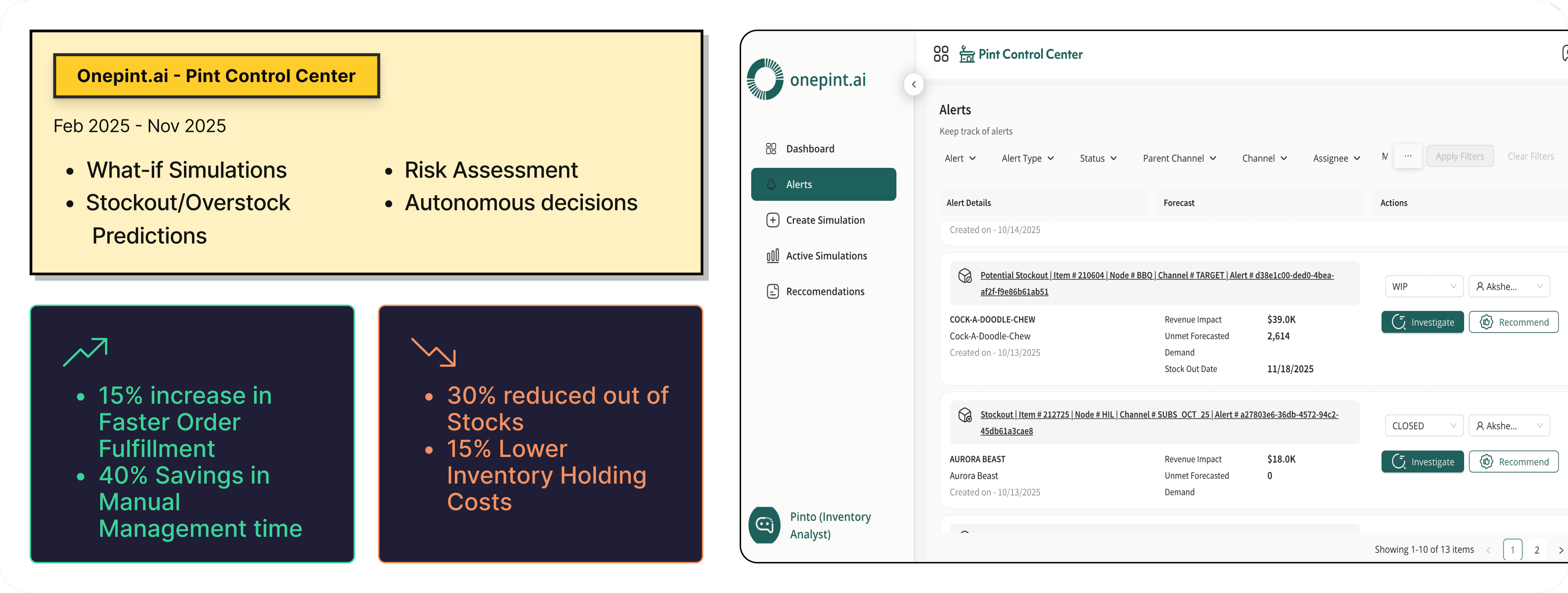
Product: Pint Control Center: AI-Powered Inventory Optimization
Role: UX Designer (part of cross-functional team with PMs, engineers, and data scientists)
Timeline: Q4 2024 - Q3 2025
Platform: Enterprise Web Application
Team: UX Designer × Director × Tech Lead × Data Science × Product Manager
Introduction
Pint Control Center: AI-Powered Inventory Optimization
The goal was to transform complex supply-chain data into an intuitive, proactive, and actionable decision-making platform for planners, operations managers, and business leaders.
This case study captures how I approached the problem from understanding user needs to shaping a system that predicts risks, recommends transfers, and unlocks real-time visibility across warehouses.
Context
Modern retail, D2C, and multi-warehouse businesses struggle with fragmented systems like ERPs, WMS tools, spreadsheets, and siloed teams.
This results in delayed stock movements, over-stock at one location and stock-out at another, manual firefighting, no predictive visibility, and no single source of truth.
Problem
From user research, three key pain points emerged.
Prevent Stock Disruptions -
Predict stockouts and overstock before they impact your bottom line.Plan With Confidence and Minimize Financial Risk -
Assess the financial impact of inventory issues in real time and test different strategies with scenario planning before making key inventory decisions.Optimize Stock Distribution -
Ensure the right stock is at the right place at the right place with Al-suggestedtransfers and replenishment plans.
Boost Productivity and Empower Teams -
Automate routine inventory decisions, freeing up time for strategic planning and Improve decision-making with a centralized platform that connects supply chain,finance, and operations teams.
What does OneTruth Offer
What-if Simulations
Predict stockouts and excess inventory before they impact your bottom line.Assess financial risks in real-time and take corrective action before disruptions occur.
Stockout/Overstock Predictions
Monitor every event affecting supply, demand, and available-to-promise (ATP) for a complete, up-to-the-minute view. Optimize stock distribution with AI-driven recommendations, ensuring products are available where and when they’re needed.Risk Assessment
Save time by automating routine inventory decisions, reducing manual intervention.Ensure critical issues get the attention they need, with automatic escalation to planners.Autonomous decisions
Test different scenarios, such as supplier delays or demand surges, to understand their impact.
Make informed decisions by visualizing potential risks and identifying the best course of action.
Seamless Collaboration & Insights
Empower teams with real-time, data-driven insights, keeping planners, analysts, and financial leaders aligned.Improve decision-making with a centralized platform that connects supply chain, finance, and operations teams.
Challenge
Complex Data Structures
Inventory data spans SKUs, batches, locations, supplier SLAs, and multi-location demand. Simplifying this complexity without losing meaning was a core challenge.
Multiple User Roles
Daily planners, monthly supply managers, and quarterly business leaders all needed the system.
Designing an interface that adapts to each mindset required careful prioritization.Translating AI into Human Actions
AI predictions alone are not useful.The challenge was converting them into understandable, trustworthy, and actionable insights.
Avoiding Cognitive Overload
Users needed clarity, not clutter.
Balancing information depth while avoiding overwhelming screens required multiple iterations.
Design Decisions
Incorporate Pinto (AI agent) into the workflow
Important information appears upfront. Advanced details open only when the user chooses to dive deeper.
MakingRisks and alerts became the starting point because users primarily come to identify and mitigate problems.
Introducing Action-Oriented Recommendations which was paired with a clear action like “Move 120 units from Warehouse A to Warehouse B.”
Multi-Level Drill-Downs
Users can move from an overview to SKU-level risk, then to warehouse analytics, and finally to an action workflow.
Consistent System Language
Card structures, colors, and iconography were standardised to create familiarity across all modules.
AI Transparency
A “Why am I seeing this?” explanation was added to help users trust and understand AI logic.
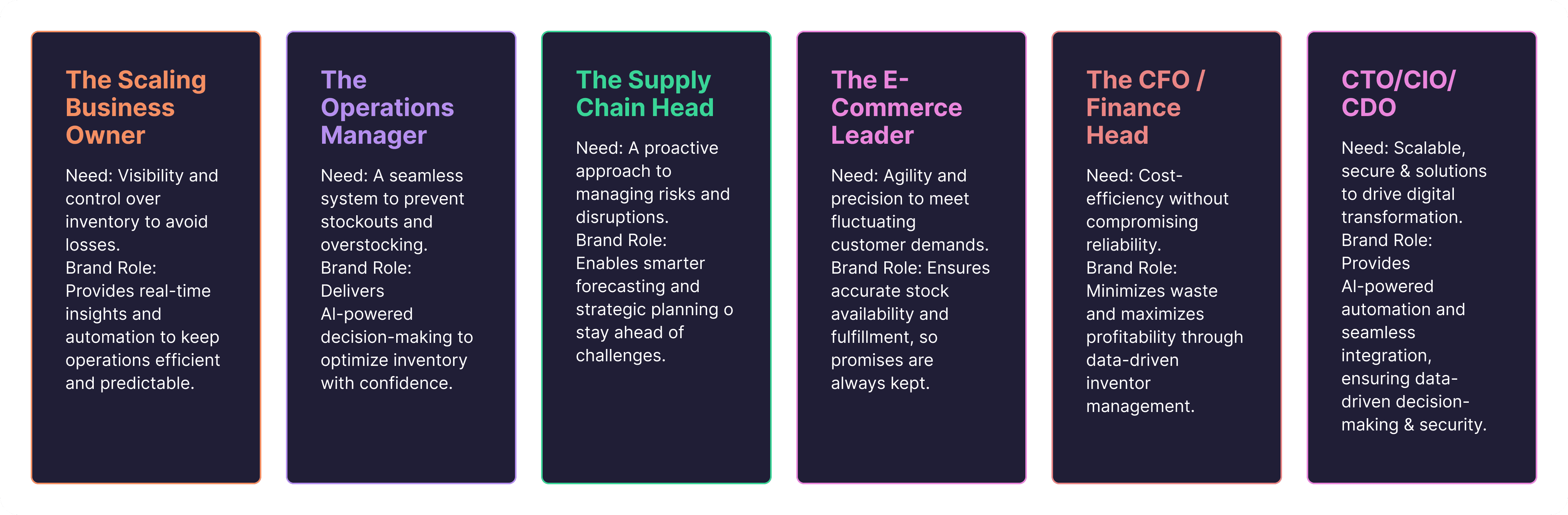
Consumer Personas
Walkthroughs of Critical Flows
Pinto (Conversational AI bot)
It is a conversational or assistant-type tool integrated into OnePint.ai’s platform. An LLM‐based virtual assistant … bridging the gap between data complexity and operational decision-making with AI supply chain solutions.
It simplifies user interaction with the analytics/data: instead of requiring users to dig through dashboards or spreadsheets, the assistant can interpret queries, surface insights, guide decision-making.
Things it can do
User can ask natural questions like which warehouses are at risk of stock-out or What transfers should we initiate
Suggests actions such as internal transfers or replenishments using AI-driven analytics.
UX design decision:
Curated some user actions such as copy, like and dislike to track the LLM model and its behaviour towards answering the questions/during conversation
While being deployed in other screen where there is heavy data the pinto screen which is a 100% ratio can now be minimized to a 30 % ratio and the rest 70% contains the rest of the screen with heavy data about the inventory.
From the data heavy screen/native screen the user can chat with pinto and pinto responses with solutions for the same.
User can save the conversation and can later continue them. They can also start a new conversation without being lost
Incorporated (Prompt Library), Audio conversation (mic) for the pinto interaction which is played to be developed (Planned),
Filtering Options
Before

Feedbacks
Previous in this filter the ueser needs to click on many action to perform a search/filter function.
The user can't remove the item ID from the main screen.
One has to go the advance filter -> click on the green color bubblle with number -> Screen with multiple numbers would be displayed.
From this screen the user can delete them or add them.
This includes too many clicks and also it was confusing for the user while handling this large number of data
After

Efficiency - Filter options
EfficiencyIn this the search/filter option can be just completed in two clicks. Thus by reducing the Number of clicks. This way the user can act proactively and thus by increasing the efficiency
I've taken a decision that upon clicking on the search button it will hit the backend and then only the result will be displayed thus by reducing the number of hits
Introduced a horizontal scroll bar with some fields as fixed thus by prodiving the user a better visibility over large number of datas
The number bubble which shows the number of filter that are currently applied will be shown upfront thus by providing the user a better visibility to take better decisions
Personalisation
Introduced a column filter enabling the user to rearrange the columns for their preferences
Ability to change the number fields in the pagination so that it would give a better view of the data
Create Simulation
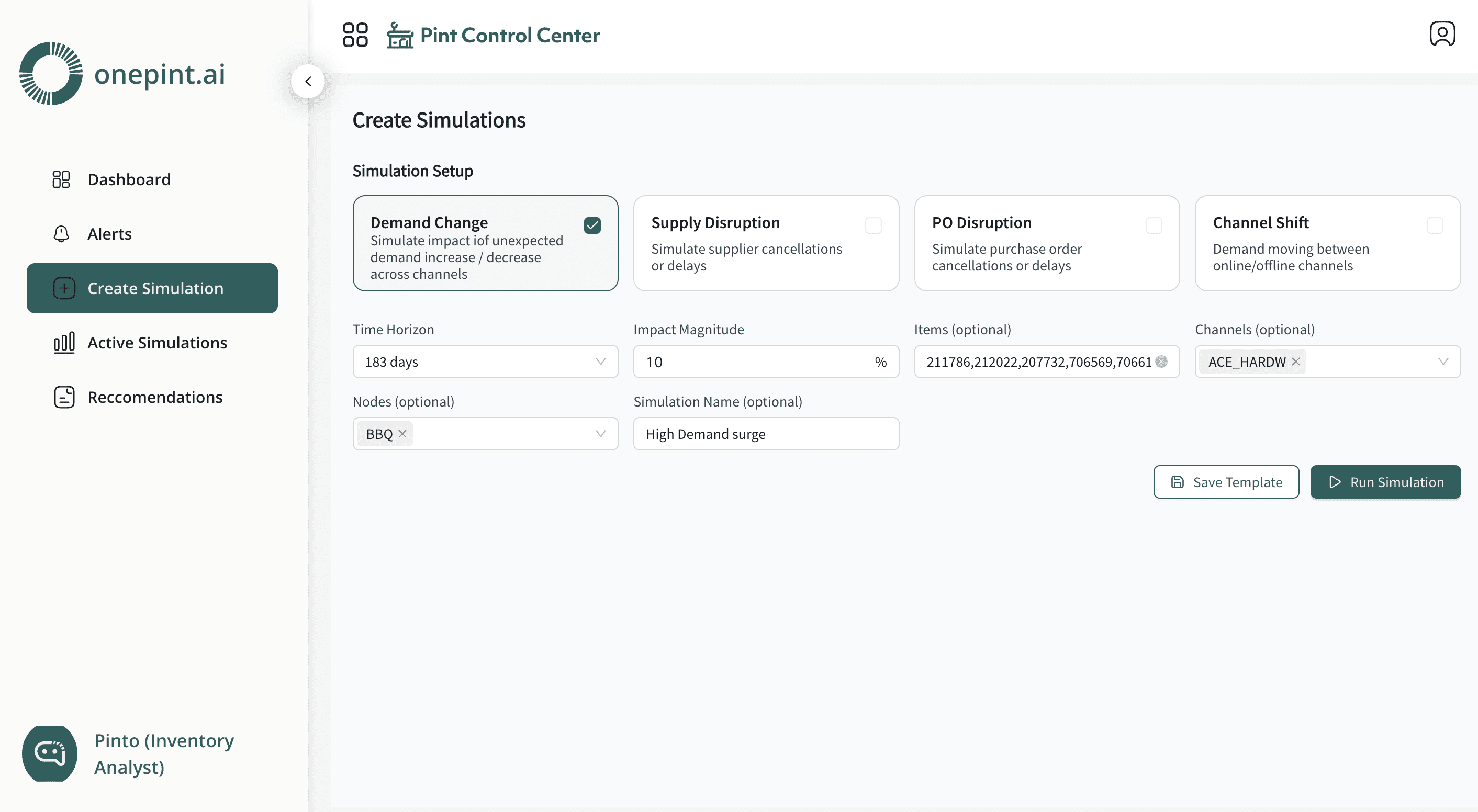
Lemme drive you through a example
There are 4 most common scenarios
Demand Surge Simulation
Demand pace unexpected demand increase / decrease across channelSupply Disruption
Simulate supplier cancellations or delaysPO Disruption
Simulate purchase order cancellations or delays
Channel Shift
Demand moving between online/offline channels
Scenario
“What if the supplier shipment for SKU A101 gets delayed by 7 days?”
System Output
Stock-out predicted in Warehouse B on Day 5
Safety stock breach in Store C
Potential impact: 140 missed orders
Recommended actions:
Move 60 units from Warehouse A to Warehouse B
Increase replenishment frequency for next 2 weeks
UX Outcome
The user can instantly see how a supplier delay cascades across locations and act before disruptions occur.
What Pint Control Center (Pinto) Does
Pinto acts as the central intelligence layer for inventory and supply chain operations.
Instead of teams manually checking reports, switching between systems, or reacting late, Pinto continuously analyzes real-time data and proactively tells users what is going wrong and what to do next.
Creates a Single Source of Truth
Pinto connects data from warehouses, stores, suppliers, and sales channels to give one unified view of inventory.
No more spreadsheets or cross-checking multiple dashboards.Predicts Future Problems
Pinto uses AI to detect upcoming risks such as:
Stock-outs
Over-stock
Supplier delays
Demand surges
Misaligned inventory across locations
This lets teams act before the disruption happens.
Recommends the Best Actions
Instead of just showing data, Pinto guides users by saying:
“Move 120 units from Warehouse A to Warehouse B.”
“Expedite PO #234.”
“Increase buffer stock for SKU S91.”
It gives ready-to-execute recommendations.
Optimizes Internal Transfers
Pinto identifies imbalances across warehouses and suggests:
Where stock should come from
Where it should go
How much to move
When to move it
This reduces both excess inventory and shortages.
Runs What-If Simulations
Users can test scenarios like shipment delays, demand spikes, or warehouse closures.Pinto shows the impact and generates the best mitigation plan.
Aligns Teams Across Supply Chain, Finance, and Ops
Everyone sees the same risks, predictions, and actions.This improves coordination and reduces decision lag.
Recommendation
Pinto provides recommendation for the user with multiple options and also with the details. it will provide upto 3 options so that the user can select from them.
Investigating the alerts
Recommendation alerts
Where in this the pinto AI bot conversation, the details that you see is of heavy data and therefore too much of scrolling would be a pain for the customer and also the data that is presented
Active Simulation
Active Simulations are real-time, continuously running scenario models inside Pinto that monitor live data and automatically evaluate “what-if” situations without the user needing to trigger them manually. List of options that are available right now
Demand Surge Simulation
Demand pace unexpected demand increase / decrease across channelSupply Disruption
Simulate supplier cancellations or delaysPO Disruption
Simulate purchase order cancellations or delays
Channel Shift
Demand moving between online/offline channels
The below screen displayes the -
High Impact Stockout Timeline
Items at risk, Potential Loss, Minimum days to stockout, Well stocked
It will display the list with the actions to monitor them at which it can give the recommendations for the user to work on the items
Impact :
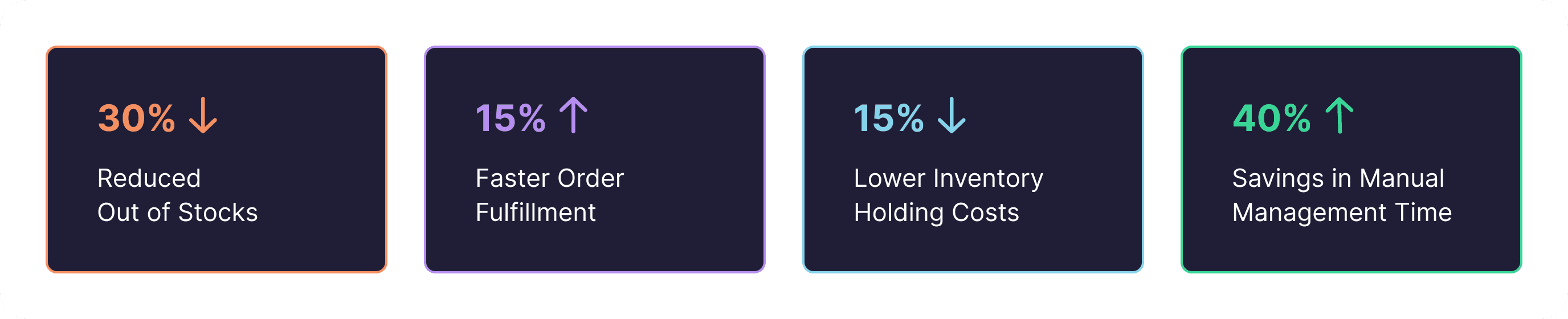
These results are the real time results obtained from various clients
Milestones
Architected and launched Al-enhanced Inventory Planning System,achieving rapid market validation with 3 signed clients post-launch
GO-LIVE for one of our clients on November
Outcome
The final design of Pint Control Center helped teams move from reactive firefighting to proactive planning.Users now detect risks early, take guided actions, optimise stock movements, improve service levels, and reduce excess inventory.